Prophet's Chaturbate Short Codes Guide
Introduction
Recently Chaturbate introduced a function called Shortcodes.
Shortcodes are specific codes that can be typed into a chat room to automatically create clickable links with predefined actions.
These shortcodes can act as a shortcut for users to perform various functions like joining a specific page or becoming a supporter. Broadcasters can also use shortcodes to generate a clickable tip requests.
Shortcodes can also be used in Room BOTs and Apps to enhance Tip Menus or Notifier Messages.
The available Shortcode commands are:
This guide is part of Prophet's Cam Guide List
Recently Chaturbate introduced a function called Shortcodes.
Shortcodes are specific codes that can be typed into a chat room to automatically create clickable links with predefined actions.
These shortcodes can act as a shortcut for users to perform various functions like joining a specific page or becoming a supporter. Broadcasters can also use shortcodes to generate a clickable tip requests.
Shortcodes can also be used in Room BOTs and Apps to enhance Tip Menus or Notifier Messages.
The available Shortcode commands are:
- [cb:help]
- [cb:signup]
- [cb:supporter]
- [cb:fanclub]
- [cb:follow]
- [cb:tip]
This guide is part of Prophet's Cam Guide List
Shortcodes Explained:
Each Shortcode is explained below with an example of each one.
[cb:help]
This shows information about the shortcode system and shows each of the shortcodes.
When you type this into the Chat Room it will display a help message block showing all the available shortcodes.
Only you will see the help message block in the chat room.
[cb:signup]
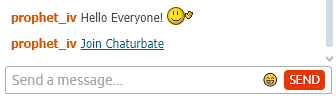
Generates a clickable link in the chat room showing the text Join Chaturbate
When a user clicks the link it will open the signup page using the broadcaster user’s affiliate tracking tags.
This shortcode is designed to always return the signup link with the broadcaster’s campaign / affiliate code, regardless of who in the broadcaster’s room types in that shortcode.
When a Broadcaster or Room User uses this shortcode the result will look like this to all the Room Users:
[cb:supporter]
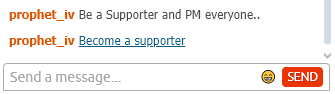
Generates a clickable link with the text "Become a supporter"
When this link is clicked the user is directed to the supporter page to upgrade their Chaturbate Membership
When a Broadcaster or Room User uses this shortcode the result will look like this to all the Room Users:
[cb:fanclub]
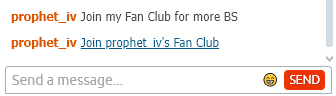
Generates a clickable link with the text "Join <broadcasters> Fan Club".
When the link is clicked, it opens the broadcaster’s Fan Club page.
If the user doesn’t have a Fan Club set up, an error dialog will be displayed to explain this.
When a Broadcaster or Room User uses this shortcode the result will look like this to all the Room Users:
[cb:follow]
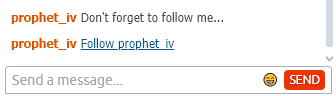
Generates a clickable link with the text "Follow <broadcaster>".
When a user clicks on this link, it triggers the user to follow the room.
If the user is already following the room, the shortcode is designed to do nothing.
When a Broadcaster or Room User uses this shortcode the result will look like this to all the Room Users:
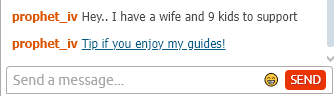
[cb:tip amount=50 message="Tip if you enjoy my guides!"]
Generates a clickable tip link displaying the quoted message text.
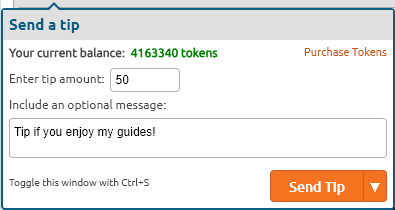
Clicking the link will open the Tip Dialog Box with the tip amount (in this case 50) already entered.
The message (in this case, "Tip if you enjoy my guides!") is pre-populated in the Tip Note Box.
This shortcode is allowed only for Broadcasters and Apps.
When a Broadcaster or App uses this shortcode the result will look like this to all the Room Users:
When a User clicks on the link it will open the Send A Tip dialog box with the tip amount and tip note message already filled in:
This function works best when you use it in your Tip Menu Bot or App.
When it is set up correctly all your Tip Menu items will have clickable links.
Limitations of this Shortcode:
The maximum Tip Value you can use is 9999 tokens.
The maximum characters you can use in the message is 73 characters.
Exceeding these limits will cause this shortcode to fail.
Each Shortcode is explained below with an example of each one.
[cb:help]
This shows information about the shortcode system and shows each of the shortcodes.
When you type this into the Chat Room it will display a help message block showing all the available shortcodes.
Only you will see the help message block in the chat room.
[cb:signup]
Generates a clickable link in the chat room showing the text Join Chaturbate
When a user clicks the link it will open the signup page using the broadcaster user’s affiliate tracking tags.
This shortcode is designed to always return the signup link with the broadcaster’s campaign / affiliate code, regardless of who in the broadcaster’s room types in that shortcode.
When a Broadcaster or Room User uses this shortcode the result will look like this to all the Room Users:
[cb:supporter]
Generates a clickable link with the text "Become a supporter"
When this link is clicked the user is directed to the supporter page to upgrade their Chaturbate Membership
When a Broadcaster or Room User uses this shortcode the result will look like this to all the Room Users:
[cb:fanclub]
Generates a clickable link with the text "Join <broadcasters> Fan Club".
When the link is clicked, it opens the broadcaster’s Fan Club page.
If the user doesn’t have a Fan Club set up, an error dialog will be displayed to explain this.
When a Broadcaster or Room User uses this shortcode the result will look like this to all the Room Users:
[cb:follow]
Generates a clickable link with the text "Follow <broadcaster>".
When a user clicks on this link, it triggers the user to follow the room.
If the user is already following the room, the shortcode is designed to do nothing.
When a Broadcaster or Room User uses this shortcode the result will look like this to all the Room Users:
[cb:tip amount=50 message="Tip if you enjoy my guides!"]
Generates a clickable tip link displaying the quoted message text.
Clicking the link will open the Tip Dialog Box with the tip amount (in this case 50) already entered.
The message (in this case, "Tip if you enjoy my guides!") is pre-populated in the Tip Note Box.
This shortcode is allowed only for Broadcasters and Apps.
When a Broadcaster or App uses this shortcode the result will look like this to all the Room Users:
When a User clicks on the link it will open the Send A Tip dialog box with the tip amount and tip note message already filled in:
This function works best when you use it in your Tip Menu Bot or App.
When it is set up correctly all your Tip Menu items will have clickable links.
Limitations of this Shortcode:
The maximum Tip Value you can use is 9999 tokens.
The maximum characters you can use in the message is 73 characters.
Exceeding these limits will cause this shortcode to fail.
Using Shortcodes in your Bot or App:
For this exercise we will setup a Tip Menu using multiple [cb:tip] shortcodes.
I have used the popular "The Menu" app to show how to use the [cb:tip] shortcode.
I have set it up to use five (5) Tip Menu items:
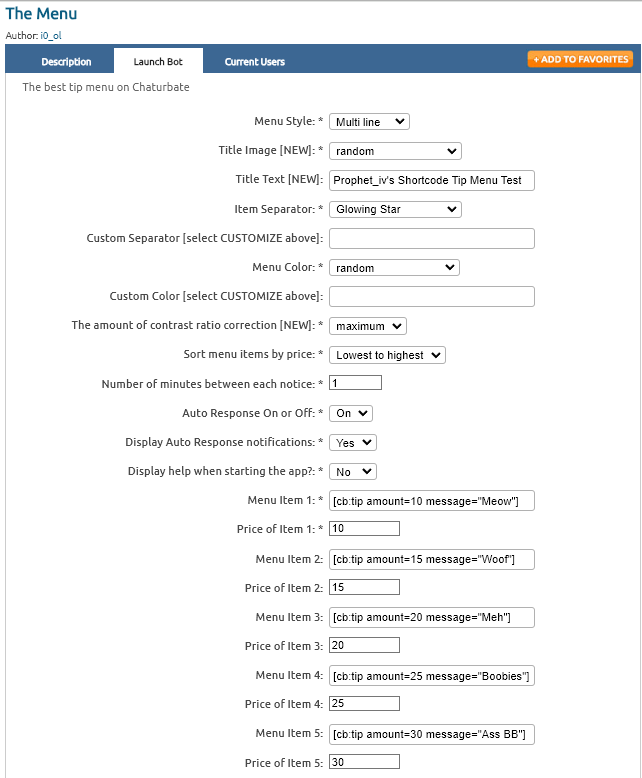
Below is a screenshot of The Menu's Tip Menu items being setup using the shortcodes for each item.
Note #1: Make sure that the shortcode amount= token value always matches the app Price of Item token value.
Note #2: Chaturbate has limited the amount= value to 9999 tokens.
Note #3: The maximum message= length is 73 characters.
Note #4: You cannot use Chaturbate GIF icons in the message= text. This will cause it to fail.
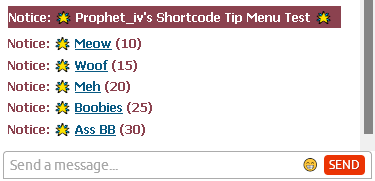
When The Menu is launched it will create this Tip Menu in the room:
When a user clicks on one of the items it will open the Send A Tip dialogue box.
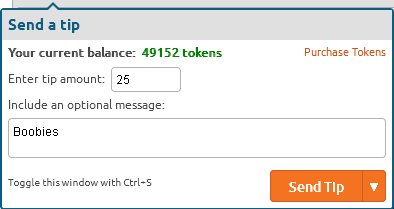
In this example the user clicked on Boobies for 25 Tokens.
The Send A Tip box will open with the Tip Amount and Tip Note values will be already filled in:
NOTE: You can use the [cb:tip] shortcode in all your room Bots and Apps that are running at the same time.
For this exercise we will setup a Tip Menu using multiple [cb:tip] shortcodes.
I have used the popular "The Menu" app to show how to use the [cb:tip] shortcode.
I have set it up to use five (5) Tip Menu items:
- Meow (10 tk)
- Woof (15 tk)
- Meh (20 tk)
- Boobies (25 tk)
- Ass BB (30 tk)
Below is a screenshot of The Menu's Tip Menu items being setup using the shortcodes for each item.
Note #1: Make sure that the shortcode amount= token value always matches the app Price of Item token value.
Note #2: Chaturbate has limited the amount= value to 9999 tokens.
Note #3: The maximum message= length is 73 characters.
Note #4: You cannot use Chaturbate GIF icons in the message= text. This will cause it to fail.
When The Menu is launched it will create this Tip Menu in the room:
When a user clicks on one of the items it will open the Send A Tip dialogue box.
In this example the user clicked on Boobies for 25 Tokens.
The Send A Tip box will open with the Tip Amount and Tip Note values will be already filled in:
NOTE: You can use the [cb:tip] shortcode in all your room Bots and Apps that are running at the same time.